WebKit Features for Safari 27.0
WebKit ·
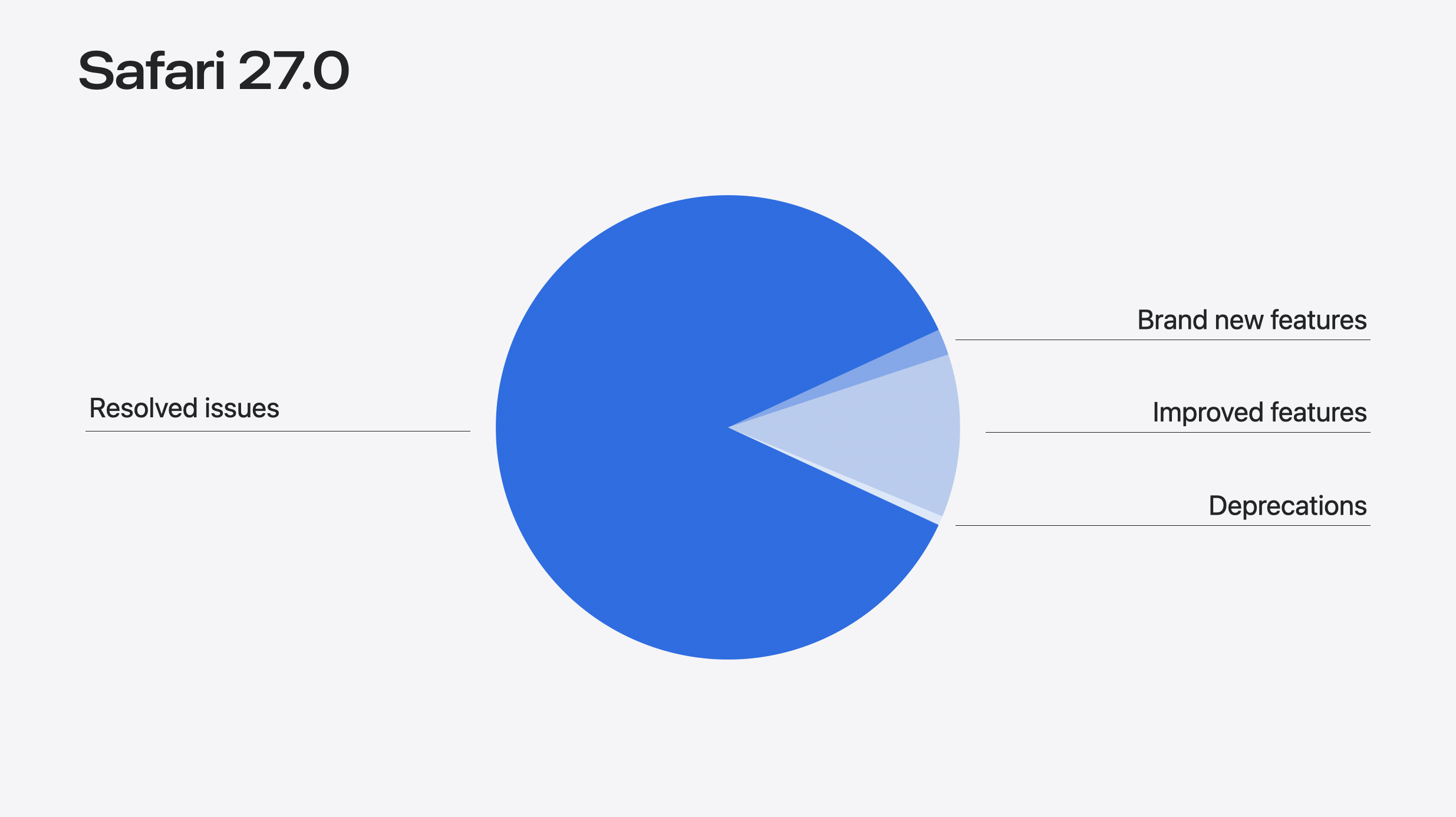
Our Safari release notes have never been as long as they are for this version.
Our Safari release notes have never been as long as they are for this version. The number of features alone rose from 58 to 83 since the first beta in June.
Safari MCP makes working with coding agents dramatically easier. Customizable select turns the real <select> element into something you can fully restyle — now with new UA default styles that provide an even-better starting place. Scroll anchoring stops content from jumping when something loads in above. The <model> element comes to iOS, iPadOS, and macOS, giving 3D a powerful HTML element. Websites can now provide immersive environments on visionOS. And much more.
Are you developing websites using coding agents? The Safari MCP server, now available in Safari 27.0 will make your workflow faster and more powerful. Give Claude Code, Codex, or the agent of your choice control over the browser window so it can see how your code renders. Safari MCP provides access to the DOM, network requests, screenshots, and console output. Your agent can do more on its own while you do less hopping between windows, less dropping screenshots in your terminal, and less typing prompts to describe what’s not working.
The Safari MCP server enables your agent to:
And much more. The MCP server runs entirely on your local machine. It makes no network calls of its own. It does not have access to your personal information in Safari. And any captured data goes directly to the agent you’re running, not to Apple.
To give it a try, go to Safari > Settings > Developer > check “Allow remote automation and external agents.” (If the Developer pane is not available, first go to Advanced, and check “ Show features for web developers ”.)
If you’re using Claude:
claude mcp add safari-mcp -- "/usr/bin/safaridriver" --mcp If you’re using Codex:
codex mcp add safari-mcp -- "/usr/bin/safaridriver" --mcp For other agents, you put the following in your mcp.json or config.json file.
{ "mcpServers" : { "safari-mcp" : { "command" : "/usr/bin/safaridriver" , "args" : [ "--mcp" ] } } } Let us know what you think, especially if you have any feature requests. Learn more by reading Introducing the Safari MCP server for web developers , or by referencing documentation .
The biggest feature of Safari 27.0 isn’t a feature at all. It’s the tremendous effort that went into improving the quality of existing features. At WWDC, we were proud to announce 525 fixes. Then we added 60% more, reaching a total of 844. Plus the majority of feature work improves existing features.
When we look at the efforts we made to improve quality, the story can be seen in several themes.
Compatibility. Our team made many changes to help make specific websites work correctly for their users. For example, Hindi InScript typing in an online document editor, images vanishing from search results on a restaurant reservation site, and Pahawh Hmong text misrendering in an online encyclopedia.
Foundations. Sometimes the best way to improve quality is to start over. Safari 27.0 has an all-new ES module loader. We rebuilt CSS Zoom. And now inline layout places elements with subpixel precision.
Depth. We got deep into specific technologies. There are 66 fixes to SVG in this release alone, including an end-to-end review of the SMIL animation engine. HTML tables got a systematic pass, with absolutely positioned tables now handling percentage-sized children, min-height , and max-height correctly. Plus deep work on Media Source Extensions (MSE) and Encrypted Media Extensions (EME). And much more.
Alignment. Much of the work is to better match exactly what web standards prescribe. For example, we corrected the MathML Core operator dictionary and its spacing values across several fixes. Fixes to innerText bring Safari’s rendered-text output better in line with standards for display, visibility, white-space, and form controls. And we improved how HTTP cache obeys Cache-Control .
Integration. Sometimes two features each work perfectly alone, but combined, something starts to go wrong. We fixed a lot of these this year. For example, -webkit-line-clamp shipped in WebKit in 2010, while text-wrap: balance arrived in 2024. Before Safari 27.0, if you applied both to the same element, the balancing simply didn’t happen. Now that’s fixed.
We truly hope all of these efforts throughout the last year make your work as a web developer a little easier. Read through the resolved issues at the end of this article to see specifics. And learn more about what we are doing to raise the quality of WebKit by watching What’s new in WebKit for Safari 27 .
The <select> element has been part of the web since the very beginning of HTML. But until recently, there wasn’t a lot you could to do style it or fill it with custom content. Customizable Select changes that. Now in Safari 27.0, it lets you build a fully custom drop-down menu to match the look and feel of your website or web app, without reaching for JavaScript or a pile of <div> . You can even push far beyond a typical drop-down menu to a very different UI. Because it’s a real form control, you get automatic, reliable support for keyboard navigation, screen readers, form submission, validation, change events and more.
Start by applying appearance: base-select in your CSS. This immediately switches to the look and feel provided by new UA styles, and enables the new powers in HTML.
select , select :: picker ( select ) { appearance : base-select } You might notice that the default UA styles in Safari 27.0 are different than they were for the first beta back in June. The summer gave us the opportunity to reflect on what it will be like for web developers to write custom styles on top of the new defaults. We realized after 30 years of web developers struggling with form control styling, we wanted to provide something even better.
Previous default UA styles for Customizable Select on the left, with the new design on the right. These defaults set you up with all the basics. You won’t be left with homework to do to get the select into a usable state. You can simply switch to the new control with appearance: base-select , and apply as little or as much additional code as you’d like. Don’t like the new defaults? You are in luck, it’s very easy to override them. Feel fine keeping any of these pieces like the new drop shadow, 4px rounded corners, touch-friendly line height, cleaner hover states, user-ready chevron & checkmark, subtle opt group styling, etc? Great! It’s already done for you, with support for all the variations like light & dark modes, forced color mode, disabled states and more.
We brought this new design to the CSS Working Group, where it’s being further discussed and refined. Once other browsers update their implementations, we will together reach our shared commitment for all browsers to support an identically interoperable starting place.
New pseudo-elements like ::picker-icon and ::checkmark let you easily target parts of the control that were previously unstylable. Plus, you can now insert HTML elements inside each <option> to add more detail. The new <selectedcontent> element can be used to adjust what gets displayed as the currently-selected option’s content. Learn more watching Rediscover the HTML Select Element from WWDC26.
Model Originally shipped a year ago in visionOS, the HTML <model> element is now also available in Safari on iOS, iPadOS, and macOS. This new element is a lot like video , audio , and img — this time embedding a 3D model in the page.
< model src = "mallet.usdz" > </ model > Just like the other HTML elements for media, you can link to multiple source files, including a fallback.
< model > < source src = "boot.usdz" type = "model/vnd.usdz+zip" > < source src = "boot.glb" type = "model/gltf-binary" > < img src = "boot.png" alt = "workboot in light tan leather" > </ model > You can optionally include attributes like environmentmap to provide custom lighting for your model. Or stagemode , which sets the default interaction behavior. Target your model with JavaScript and open up a wide range of possibilities.
Learn all about it, including where to get a 3D model, how to optimize it for the web, and what can be done with JavaScript by watching Get started with the HTML Model Element from WWDC26. And check out these demos in Safari.
Safari 27.0 also adds support so the CSS dynamic-range-limit property can be applied to the <model> element, giving you control over HDR tone mapping and rendering range for 3D content on iOS and macOS.
Responsive image techniques get easier with the auto keyword for sizes .
< img src = "photo.jpg" srcset = "photo-400.jpg 400w, photo-800.jpg 800w, photo-1200.jpg 1200w" sizes = "auto" loading = "lazy" width = "1200" height = "800" alt = "A mountain landscape" > Using sizes="auto" on an image with loading="lazy" tells the browser to automatically calculate the size based on the actual layout width once it’s known. This means you don’t have to predict the rendered layout width ahead of time.
Safari 27.0 adds support for the shadowrootslotassignment attribute on declarative shadow roots. This lets you configure the slot assignment mode ( named or manual ) directly in HTML when defining a shadow root declaratively, matching the JavaScript attachShadow({ slotAssignment: "manual" }) option.
Environments in visionOS are an incredible part of the experience of Vision Pro. They let you transform your physical surroundings into a different place—like Yosemite, Mount Hood, or the Moon. It’s been possible for Apple developers creating immersive apps for visionOS to provide custom environments with their app. Now in Safari 27.0, environments can be provided as part of a website.
You can provide an immersive environment with a simple <model> element and one JavaScript API call. The Immersive API on the model element works similarly to how the Fullscreen API does on video elements. Learn all about it in Explore immersive website environments in visionOS .
By the way, this new Immersive API replaces the developer preview originally called Spatial Backdrop. If you built anything using Spatial Backdrop, migrate it to the Immersive API on the <model> element.
Now the <img> element has a controls attribute in HTML. It works just like the controls attribute on the video and audio elements. When present, the browser offers controls to allow the user to adjust or more fully experience the media.
< img controls src = "panorama.jpg" alt = "A panorama of the Dolomites" > In Safari 27.0 in visionOS when the controls attribute is present, Safari provides a user interface for interacting with spatial and panorama photos. This gives users an easy and consistent mechanism to view photos spatially or immersively, and eliminates the need for web developers to build their own UI.
WebXR Safari 27.0 adds support for texture array projection layers in WebXR Layers. When creating a projection layer with XRWebGLBinding.createProjectionLayer() , you can now request textureType: "texture-array" so each eye’s view renders into its own layer of a single texture array.
Many websites inject content into the page as the user is reading or viewing that content. The new content often appears above where the user is currently looking — like images, ads, or comments being injected into the page. In the past, this caused the content the user was reading to be suddenly pushed down, causing a disorienting jump to a random place on the page.
Now with support for Scroll Anchoring, Safari 27.0 instead adjusts the scroll position and keeps the content exactly where it was before the content insertion. As a web developer, you don’t have to do anything to enable this on your site. It just works.
Scroll anchoring is controlled by the overflow-anchor CSS property, which defaults to auto . If you have a specific need where you need to opt out of scroll anchoring, you can use overflow-anchor: none .
Safari 27.0 adds support for using stretch with the properties width , height , min-width , max-width , min-height , max-height , and flex-basis . The stretch keyword tells an element to fill the available space in the relevant axis.
.card { width : stretch ; } It’s just like using width: 100% — but this time accounting for margins, which prevents overflow. If you’ve been using -webkit-fill-available to solve this need, now is a good time to switch.
Safari 27.0 makes three updates to anchor positioning, as the web standard evolves and the tool becomes more powerful.
First, we added support for transform-aware anchor positioning. Now, when an anchor element has a CSS transform applied — scale, rotate, translate, or any combination — elements positioned relative to that anchor follow its transformed position instead of its pre-transform layout position. This works for transforms applied via the transform property as well as through the individual translate , rotate , and scale properties. If you use anchor positioning to attach a tooltip, popover, or annotation to a transformed element, it now tracks correctly, even with animated transforms.
Second, the default value for position-anchor changes from auto to normal , fixing a potential side effect where the positioning behavior of elements that don’t even use Anchor Positioning could be impacted. The new value none opts out entirely. The new default, normal , behaves the same as none unless position-area is also set, in which case it behaves like auto did, as originally intended.
And third, Safari 27.0 also adds support for anchor-valid and anchor-visible . Originally, position-visibility: anchors-valid hid an element if any of its required anchor references couldn’t be resolved. However, it wasn’t clear what constituted “required anchor references”. So the CSS Working Group changed the behavior to only look at the default anchor box. To match, some keywords were renamed to drop the plurality. The anchors-valid value is now anchor-valid , while anchors-visible is now anchor-visible . Safari 27.0 aligns with the new behavior, and temporarily supports the old keywords for compatibility.
The new alpha() relative color function is a shorthand for adjusting just the alpha channel of an existing color, without repeating the rest of its channels: alpha(from var(--mycolor) / 80%) . It keeps the origin color in its own color space and only changes the alpha value — useful when you want a more transparent or more opaque version of a color you already have, without writing out the full relative color syntax.
The color-mix() function now accepts more than two colors, so you can blend several colors together at once, like color-mix(in oklab, teal 20%, olive 30%, blue 50%) . If you leave out the percentages, each color contributes equally.
The image(<color>) function lets you use a solid color anywhere an <image> value is expected. Unlike background-color , which sits underneath all background layers, image(<color>) behaves like a real image layer — it can stack above other background images, get sized with background-size , and be positioned and clipped like any image.
Safari 27.0 also adds support for forwarding missing color components when interpolating between analogous color spaces. Previously, a color with an intentionally missing component ( none ), like an achromatic gray with no meaningful hue, could get incorrectly assigned a hard 0 when converted into an analogous space for interpolation, producing a subtly wrong blended color. Now the missing component is carried forward as missing instead, so interpolation behaves the way you’d expect.
The light-dark() function now accepts <image> values, not just colors, so you can specify different images for light and dark color schemes in a single declaration: background-image: light-dark(url(day.png), url(night.png)) . Gradients work here too.
Safari 27.0 adds support for the :heading pseudo-class, which matches any heading element — <h1> through <h6> . Instead of writing h1, h2, h3, h4, h5, h6 in your selector list, you can just write :heading . Plus, :heading also has a functional form for targeting specific levels, for example, :heading(1, 2) matches only <h1> and <h2> .
The revert-rule keyword is now supported in Safari 27.0. Like revert and revert-layer , revert-rule rolls back the cascade — but specifically to the state as if the current style rule had not been present. It gives you a more precise tool for working with overrides, especially in component libraries and design systems where you want to selectively undo declarations within a rule without losing the rest.
The CSS progress() function now supports a no-clamp option in Safari 27.0. By default, progress() returns how far a value sits between two bounds as a ratio from 0 to 1, clamped to that range. Adding no-clamp removes the clamp, so the result can fall below 0 or above 1, which is useful when you want an effect to keep scaling past its defined bounds instead of flattening out at the edges.
Safari 27.0 adds support for contain: style applying to CSS quotes. This allows you to scope effects of quotes to a certain subtree.
Safari 18.4 added support for text-autospace to control spacing between Chinese/Japanese/Korean (CJK) and non-CJK characters. Safari 27.0 now adds the insert keyword, making text-autospace: ideograph-alpha ideograph-numeric and text-autospace: ideograph-alpha ideograph-numeric insert equivalent.
The Dutch IJ digraph is now supported in Safari 27.0. When the content language is Dutch ( lang="nl" ), text-transform: capitalize and ::first-letter now correctly titlecase “ij” to “IJ” at the start of words.
Safari 27.0 adds support for the case-sensitive s modifier in CSS attribute selectors. Adding s after the value forces a case-sensitive match — for example, a[href$=".PDF" s] matches only a literal uppercase .PDF . This is the counterpart to the i modifier you may already be using to force case- insensitive matching ( a[href$=".pdf" i] matches .pdf , .PDF , .Pdf , and so on); s lets you go the other way when you need an exact-case match on an attribute HTML would otherwise treat as case-insensitive.
Safari 27.0 also adds support for the :host:has() compound selector, letting a shadow host style itself based on what’s inside its own shadow tree. Because :has() can compound onto any selector, :host:has(:checked) or :host:has(::slotted(img)) let a custom element’s host change its own appearance depending on the state of its shadow content — useful for web component authors who want the host to react to what’s inside it without reaching for JavaScript.
Safari 27.0 adds the animation property to the AnimationEvent and TransitionEvent interfaces, letting event handlers directly access the Animation object associated with the event.
Safari 27.0 adds quite a few improvements to SVG.
Now the lang and xml:lang attributes are supported inside SVG. Use it to specify the language of text content to ensure correctness of both text rendering and accessibility announcements.
Safari 27.0 adds support for <use> referencing an external SVG file without a # fragment identifier. Previously, in order to point <use href="…"> at another SVG document, you had to name a specific element inside it with a fragment but now <use> can reference the external file on its own. There’s also a fix so <a> elements in SVG are treated consistently with HTML <a> elements for origin/security checks.
Several non-standard and legacy SVG interfaces have been removed to better align with the SVG 2 specification:
Plus, there are a huge number of SVG fixes shipping this year. See the list below for what’s improved in Safari 27.0.
Safari 27.0 adds support for WebAssembly JavaScript Promise Integration (JSPI). JSPI lets synchronous-looking WebAssembly code suspend and wait for JavaScript Promises, making it much easier to port existing C, C++, Rust, and other language code to the web where that code expects synchronous I/O.
Before JSPI, porting code that called synchronous APIs to Wasm required rewriting everything on top of a callback or async state machine. With JSPI, the Wasm module can suspend at a call site and resume when the Promise resolves — the rest of the module sees straight-line synchronous code. This is a significant capability for the Wasm ecosystem.
Safari 27.0 includes a complete standards-compliant rewrite of the ECMAScript module (ESM) loader. The new loader is implemented in native C++ and conforms directly to the ECMAScript specification’s module loading algorithms, replacing an earlier implementation based on an abandoned 2016 WHATWG Loader proposal that predated top-level await entirely.
The rewrite fixes module execution ordering and initialization issues that could cause imports to access exports before they were fully evaluated. It was validated against test262, the Web Platform Tests, and additional test cases.
Top-level await is a foundational feature of modern JavaScript module authoring, and it’s been a real pain point in Safari for a while — a known source of cross-browser bugs that developers building module-based apps had to work around. This fix closes that gap. To learn more, read Fixing Top-Level Await in Safari .
Safari 27.0 adds support for the TC39 BigInt Math proposal, which brings Math -equivalent operations to BigInt as static functions on the BigInt constructor: BigInt.abs , BigInt.sign , BigInt.sqrt , BigInt.cbrt , BigInt.pow , BigInt.min , and BigInt.max . Like the existing BigInt.asIntN() , they’re called directly on BigInt rather than as instance methods, since BigInts are primitives.
This fills a real gap: Math.sqrt() and friends only accept Number , and routing a BigInt through Number to use them loses precision above 2^53. BigInt.sqrt() and BigInt.cbrt() truncate toward zero, so BigInt.sqrt(16n) returns 4n and BigInt.sqrt(17n) also returns 4n — there’s no ceil , floor , or round variant, since there’s no fractional BigInt to round in the first place. The proposal is still at TC39 Stage 1, so treat the exact API as early and possibly still changing.
Safari 27.0 adds support for import defer , a TC39 Stage 3 proposal that lets you import a module without evaluating it right away. The module and its dependencies are still loaded and linked up front, as part of the normal module graph — only execution is deferred, until the first time you access a property on the imported namespace:
import defer * as ns from "./big-library.js" ; // big-library.js hasn't run yet — no top-level side effects, // no cost beyond parsing and linking. ns . doSomething (); // first property access triggers evaluation, synchronously import defer only works with the namespace form ( import defer * as ns ) — there’s no equivalent yet for named imports like import defer { x } from "…" , and modules that use top-level await can’t be deferred, since evaluation has to stay synchronous when you access the namespace.
This builds on the ECMAScript module loader rewrite described above: it gives you a standards-based way to keep expensive module initialization out of your startup path — large libraries, polyfills, or platform-detection branches where you import several possible modules but only end up needing one.
Safari 27.0 adds support for the Service Worker static routing API . This lets a service worker declare routing rules that the browser can use to bypass the service worker entirely for certain requests, reducing overhead for high-performance PWAs.
Safari 27.0 adds three improvements to ReadableStream . First, the async iteration with for await...of :
const response = await fetch ( "/data" ); for await ( const chunk of response . body ) { process ( chunk ); } Second, the ReadableStream.from() static method for creating a stream from any async iterable or iterable:
const vegetables = [ "Carrot" , "Broccoli" , "Tomato" , "Spinach" ]; const asyncIterator = ( async function * () { yield 1 ; yield 2 ; yield 3 ; })(); // Create ReadableStream from the array const myReadableStream = ReadableStream . from ( vegetables ); // Create ReadableStream from async iterator const asyncReadableStream = ReadableStream . from ( asyncIterator ); And third, the ability to transfer a ReadableStream , WritableStream and TransformStream across contexts via postMessage() .
Several Web Inspector updates in Safari 27.0 make common debugging tasks easier.
The Color Picker now shows color contrast information inline as you edit. No more switching tools mid-decision to check whether a color combination is accessible. This works when you’re editing both foreground and background colors at the same time.
The Color Picker’s format and gamut controls are also now visible upfront instead of hidden. If you’ve ever gone hunting for those options, this will help.
In the Network tab, when a resource redirects, you can now see every request in the chain rather than just the final destination. It’s much easier to figure out what’s actually happening.
The Elements tab adds Subgrid and Grid-Lanes badges that make it easy to identify subgrid and grid-lanes layout contexts as you explore a page.
The Timeline tab now includes the layout root element in Layout event details, so you can see which element triggered a layout pass. The Timeline view also uses distinct colors for style events like “Style Invalidated” and “Style Recalculated”, making them easy to tell apart from layout events at a glance, and adds a separate column showing the node associated with each layout and rendering event.
Safari 27.0 supports setting TextTrackCue.endTime to Infinity to represent an unbounded cue duration. It’s useful for captions or data cues of live streams.
Safari 27.0 adds support for synchronized video playback on macOS displays using genlock. Genlock synchronizes the timing signal across multiple displays or capture devices, which is important for broadcast, live-event, and multi-display installation setups. Even a few frames of misalignment between screens is visible. When genlock is available, video played in Safari stays in lockstep with the rest of the signal chain instead of drifting on its own clock.
Safari 27.0 improves how HDR images with gain maps are decoded and rendered, decoding them into accelerated backing stores in the GPU process. This is a rendering-pipeline improvement rather than a new API — HDR photos with gain maps (the format used by iPhone’s Adaptive HDR photos) should render more correctly and efficiently, building on gain-map rendering fixes from recent releases.
Safari 27.0 lets you override the color space a hardware VideoDecoder uses when decoding video with WebCodecs. This helps when a stream’s embedded color space metadata is missing or wrong. Now, you can tell the decoder which color space to interpret the frames in instead of being stuck with an incorrect result.
Safari 27.0 adds support for the nextslide and previousslide MediaSession actions, mapping them to the platform’s nexttrack and previoustrack commands, which are the hardware and remotes people already use to skip tracks. If a page hasn’t registered a nexttrack or previoustrack handler but has registered nextslide or previousslide , pressing next or previous invokes the slide handler instead. This lets presentation and slideshow web apps respond to the same physical controls as music and video apps.
Safari 27.0 adds support for Secure cookies on loopback hosts. For loopback hosts using plaintext HTTP, cookies marked Secure can now be set via JavaScript and Set-Cookie headers, matching the behavior of other browsers, simplifying local development and testing with Secure cookies.
Safari 27.0 now supports the clip_distances built-in value in WGSL shaders. Clip distances are a WebGPU feature that allows vertex shaders to define custom clipping planes, enabling you to discard geometry on one side of an arbitrary plane before rasterization occurs.
Canvas The radii argument of CanvasPath.roundRect() is now optional in Safari 27.0. Calling roundRect(x, y, width, height) without radii draws a plain rectangle with square corners which is the same as calling rect() , matching the behavior of other browsers.
Safari 27.0 adds srgb-linear and display-p3-linear to predefined color spaces, making these linear-light color spaces available in Canvas, WebGL, and other APIs.
Safari 27.0 updates its MathML operator dictionary to match the MathML Core specification, adding support for multi-character operators (like ++ , := , and /= ). This improves spacing and layout for these operators in complex mathematical notation.
In addition, Safari 27.0 supports tabindex , focus() , blur() , and autofocus on MathML elements, improving MathML feature parity with HTML. This makes math content fully participate in keyboard navigation and focus management, which supports interactive educational content and accessibility.
Safari 27.0 also adds support for detecting embellished operators through <mrow> for underover layout. In MathML, an operator wrapped in a grouping element like <mrow> — for example, <mrow><mo>∑</mo></mrow> used as the base of a <munder> or <munderover> — still counts as that operator for layout purposes.
And the href attribute is now deprecated on all MathML elements except <a> , matching how HTML already restricts href to elements built for navigation rather than treating it as a global attribute.
Safari 27.0 adds support for the targetLatency attribute in WebRTC, for specifying a target latency on a receiver. It adds support for the RTCRtpCodec dictionary and related constructs, improving the ability to inspect and configure codecs. It adds support for RTCRtpReceiver.jitterBufferTarget , for tuning the jitter buffer. And it adds video source width and height to RTC stats.
Safari 27.0 now supports specifying maxAge when setting a cookie via the Cookie Store API.
await cookieStore . set ({ name : "session" , value : "abc123" , maxAge : 60 * 60 * 24 * 7 , // one week, in seconds }); Editing Safari 27.0 now supports menu items that convert editable text between Simplified and Traditional Chinese characters. It’s available in the “Transformations” submenu of the context menu for relevant text selections.
Safari 27.0 adds WebDriver support for the Digital Credentials API, with commands that let automated tests simulate wallet payloads, wait indefinitely for a credential response, and simulate a user rejecting the request. This lets you write end-to-end tests for Digital Credentials flows without needing a real wallet or person to drive the interaction.
The runtime.getDocumentId() Web Extension API now has support in Safari 27.0. It adds reporting of uncaught JavaScript exceptions and unhandled promise rejections in Web Extension scripts, making extensions easier to debug. It adds support for propagating user gestures through sendMessage() , connect() , postMessage() , and executeScript() — so extensions can reliably perform actions like media playback that require user activation. And it adds support for the tabId key in chrome.windows.create() , letting an extension move an existing tab into a newly created window instead of only creating new tabs from scratch.
Safari 27.0 helps native app developers do even more using the WKWebView public API for native app developers. Build advanced browser and web-hosting experiences on top of WebKit more easily with the following new features:
Safari 27.0 comes automatically with macOS 27 Golden Gate , iOS 27 , iPadOS27 and visionOS 27 . Plus, you can update to Safari 27.0 on macOS 26 Tahoe and macOS 15 Sequoia, separate from macOS.
We love hearing from you. To share your thoughts, find our web evangelists online: Jen Simmons on Bluesky / Mastodon , Saron Yitbarek on Bluesky , and Jon Davis on Bluesky / Mastodon . You can follow WebKit on LinkedIn . If you run into any issues, we welcome your feedback on Safari UI (learn more about filing Feedback ), or your WebKit bug report about web technologies or Web Inspector. If you run into a website that isn’t working as expected, please file a report at webcompat.com . Filing issues really does make a difference.