YOLO Mode: Agent Autonomy Without the Guardrails
Docker ·
YOLO mode lets an AI agent run without asking permission. Learn what it is, why it's risky, and how to run it safely.
AI agents have come a long way in both capability and everyday use since generative AI went mainstream in late 2022. In Stack Overflow’s 2025 Developer Survey , 84% of developers said they use or plan to use AI tools in their workflow, up from 76% a year earlier. As those tools shift from suggesting code to writing files and running commands on their own, one practical question follows. How much should an agent be allowed to do without stopping to ask? Turn that dial all the way up and you reach what developers call YOLO mode.
It’s worth understanding YOLO mode before you enable it, because its main risk is easy to misread. The risk comes down to where an agent runs. On your own machine, one mistaken command can delete files, expose your credentials, and make network requests you may not want. Inside a proper boundary, however, developers can use agents in YOLO mode to unlock a new level of productivity, without jeopardizing security.
YOLO mode is the community nickname for running an AI agent with every action auto-approved. When turned on, agents can read files, write code, run shell commands, and call tools without stopping for user approval. While in Claude Code it’s the –dangerously-skip-permissions flag , other common agents each have their own version of the same switch.
The names differ, but the behavior is the same: remove the prompts and let the agent go.
YOLO mode showed up in Cursor first, then Claude Code, and by 2026 it’s a standard toggle in most coding agents. But when people ask what YOLO mode is, they’re usually asking whether they should use it, and the answer is that it depends entirely on where the agent is running.
On a regular task, a careful agent asks for permission constantly. “Can I edit this file, run this test, install this package, call this tool?”
Dozens of prompts for one feature. While these constant permission requests can help prevent agents from going rogue, each approval forces you to context switch and breaks the flow that made the agent worth using. A few reasons why developers are leveraging YOLO mode include:
If you turn approvals off, these friction points disappear for the most part, and the agent can deliver the speed it promised. But what’s the cost of giving agents the autonomy of YOLO mode?
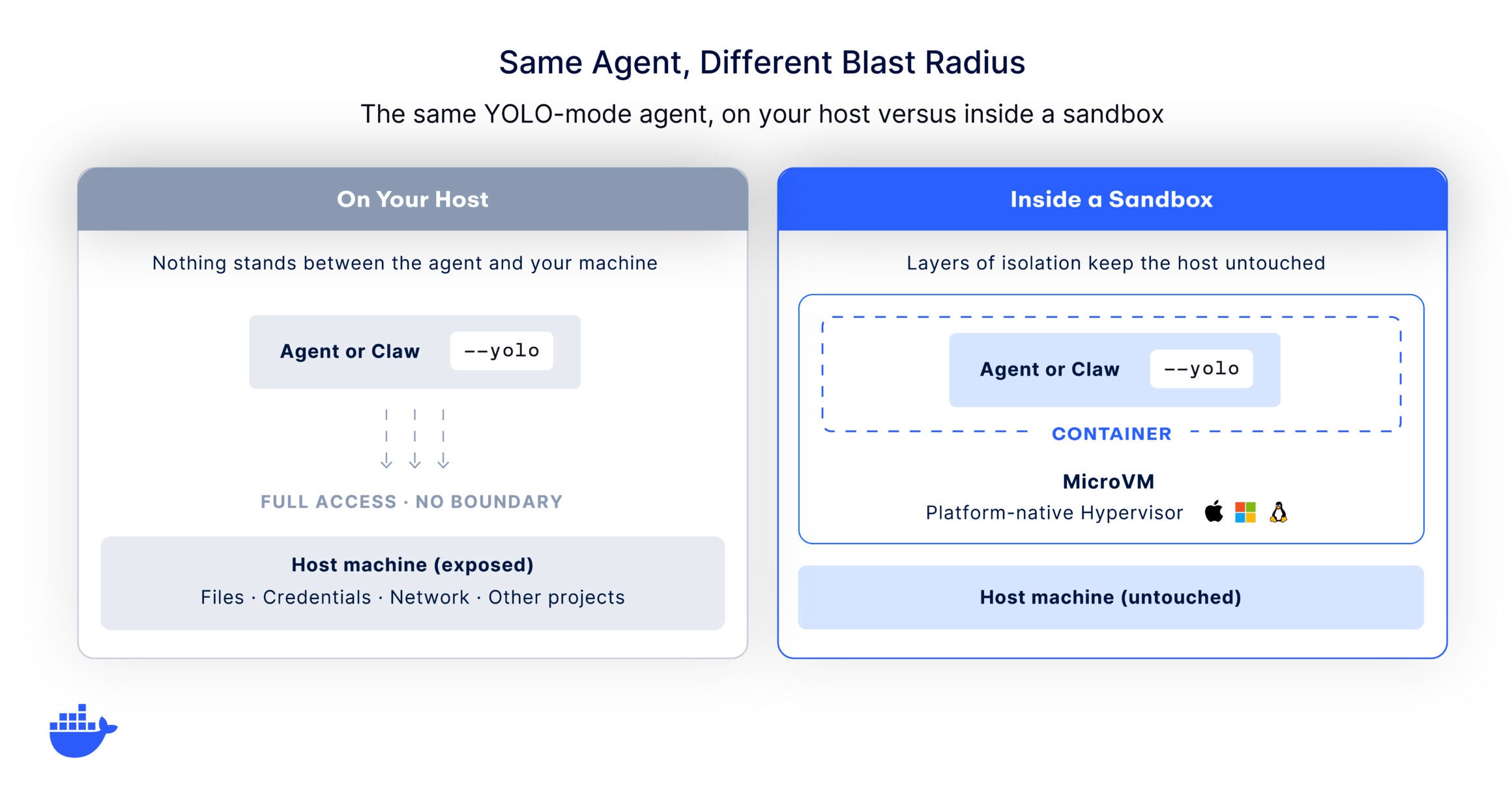
When you remove the prompts, you remove the last human check before an action runs, which amplifies the security risks agents already carry . If the agent is working directly on your host, that action has the full run of your machine, including your files, environment variables, credentials, and network. A confused or compromised agent can do a significant amount of damage when nothing stands between an agent’s decision and your system.
On an unprotected host, YOLO mode introduces risks such as:
And unfortunately, keeping manual approvals on doesn’t remove all risk. Once permission fatigue kicks in, it can be all too easy to accidentally approve the wrong request. So the safeguard belongs in the environment the agent runs in, where a bad command or a tired click has a greatly reduced scope of impact.
If prompts aren’t the answer, what is? A boundary the agent can’t cross. Guardrails only work when something outside the agent enforces them. The agent needs a bounding box, with constraints set before it runs and clear limits on what it can touch. Inside that box, it should be free to move as fast as it wants. The goal is to shape the environment so that a mistake can’t damage your systems or leak your secrets.
In practice, that means running the agent in an isolated, ephemeral environment instead of on your host. Done well, the agent gets a real place to work. It can install packages, run services, and edit files, but it can’t see your credentials, reach your other projects, or touch the host.
Unlike a container that shares the host kernel, a microVM puts a hardware-level boundary around the agent, so the isolation holds even if the agent tries to break out, and it does that without the speed penalty people expect. If a run goes sideways, you destroy the environment and start clean. This is the core idea behind sandbox security and why agents need isolation in the first place.
For one developer on a sandboxed laptop, YOLO mode is a personal choice. Across a team, it becomes a policy question. A hundred developers each deciding on their own when to skip permissions is the ungoverned-autonomy problem that keeps security leaders up at night. The picture that works at scale is one where the safe path is the default. Every agent runs inside an isolated, disposable environment, configured once at the organization level so it holds for everyone.
This is the problem AI Governance is built to solve. You define the rules once across the surfaces that matter, network access, the filesystem, and the tools an agent can reach, then enforce them automatically at every developer’s machine. Governance turns a per-developer judgment call into a consistent, repeatable capability. Clear boundaries are what let an organization extend autonomy to its agents while keeping the risk contained. Once the boundary is standard, YOLO mode is fast and safe for everyone.
Once the boundary is in place, the developer can stop supervising every step, and the payoff kicks in:
That’s the real appeal, and the sandbox is what makes it safe to lean on.
YOLO mode is really a question in disguise. How much autonomy can you give an agent before the risk outweighs the speed? Framed that way, the answer stops being about the agent and starts being about its environment. Give an agent the run of your laptop and even a small mistake is expensive. But give it a boundary it can’t cross and you get the speed with almost none of the exposure.
That’s exactly what Docker Sandboxes is built for. Each agent runs in its own disposable microVM with control over networking, filesystem access, and resource limits, so you can run agents in YOLO mode safely from day one. For teams that want those boundaries applied consistently rather than agent by agent, Docker AI Governance sets and enforces the rules everywhere developers work. Define the box. Then let the agent go as fast as it likes.
Get started with Docker Sandboxes →
Explore Docker AI Governance →
It depends entirely on where the agent runs. On your host machine, YOLO mode is risky, because a mistake or a prompt injection can reach your files and credentials. Inside an isolated, disposable environment with scoped access and no real secrets, the blast radius is contained and YOLO mode is reasonable to use.
It turns off the confirmation prompts, so Claude Code reads, writes, runs commands, and calls tools without asking for approval at each step. It trades the safety of human review for speed. It’s the most common way people run Claude Code in YOLO mode.
Run the agent inside an isolated sandbox rather than on your main machine, give it scoped network access and throwaway credentials instead of your real ones, work against a cloned or disposable copy of your project, and keep a way to inspect what it did. The goal is a boundary the agent can’t cross, not a more careful set of prompts.
Not exactly. Full YOLO mode approves everything. Some tools now offer a classifier-gated auto mode that runs safe actions automatically while still blocking or flagging dangerous ones. That’s a useful middle ground, but it’s a filter on top of the agent, not a boundary around it. Isolation still matters.